Industry
Real Estate • Productivity • SaaS
Year
2025
Tools
Figma
FigJam
Adobe Illustrator
My ReTasker — Simplifying Everyday Task
Simplifying everyday workflows for real estate professionals
Managing real estate operations often involves balancing multiple moving parts at once, from listing coordination and transaction management to client communication and document handling. My RE Tasker was designed to help streamline these day-to-day workflows through a more centralized and structured digital experience. The challenge was creating a platform that could support operational complexity without feeling overwhelming to users. Since real estate professionals already work in fast-paced environments, the interface needed to feel efficient, organized, and easy to navigate across different tasks and interactions. My approach focused on improving usability, simplifying workflow management, and designing an interface that helps users stay focused without unnecessary friction.

Creating a centralized experience for real estate operations
The platform was designed to support real estate agents, teams, and brokerages by helping them manage listings, transactions, communication, service requests, and operational workflows in one place. Instead of separating tasks across multiple disconnected tools, the experience aimed to create a more unified workflow where users could manage important activities more efficiently. The design focused heavily on clarity, accessibility, and reducing the cognitive load created by large amounts of operational information.


Designing for fast-paced operational workflows Real estate professionals often manage multiple tasks simultaneously while responding to changing schedules, client requests, and documentation needs. The experience needed to support: - faster task management - easier document handling - smoother communication workflows - simplified transaction coordination - improved operational visibility A major design focus was making complex workflows feel easier to scan and interact with, especially for users juggling multiple responsibilities throughout the day.


Structuring workflows around usability and efficiency
The process began by understanding how users move through operational tasks across the platform, from managing listings and transactions to handling communication and service requests. Early exploration focused on: - improving navigation clarity - organizing information more effectively - reducing unnecessary interaction steps - simplifying dashboard experiences - creating a more scalable layout system Different interface structures and interaction patterns were explored before refining the final experience.
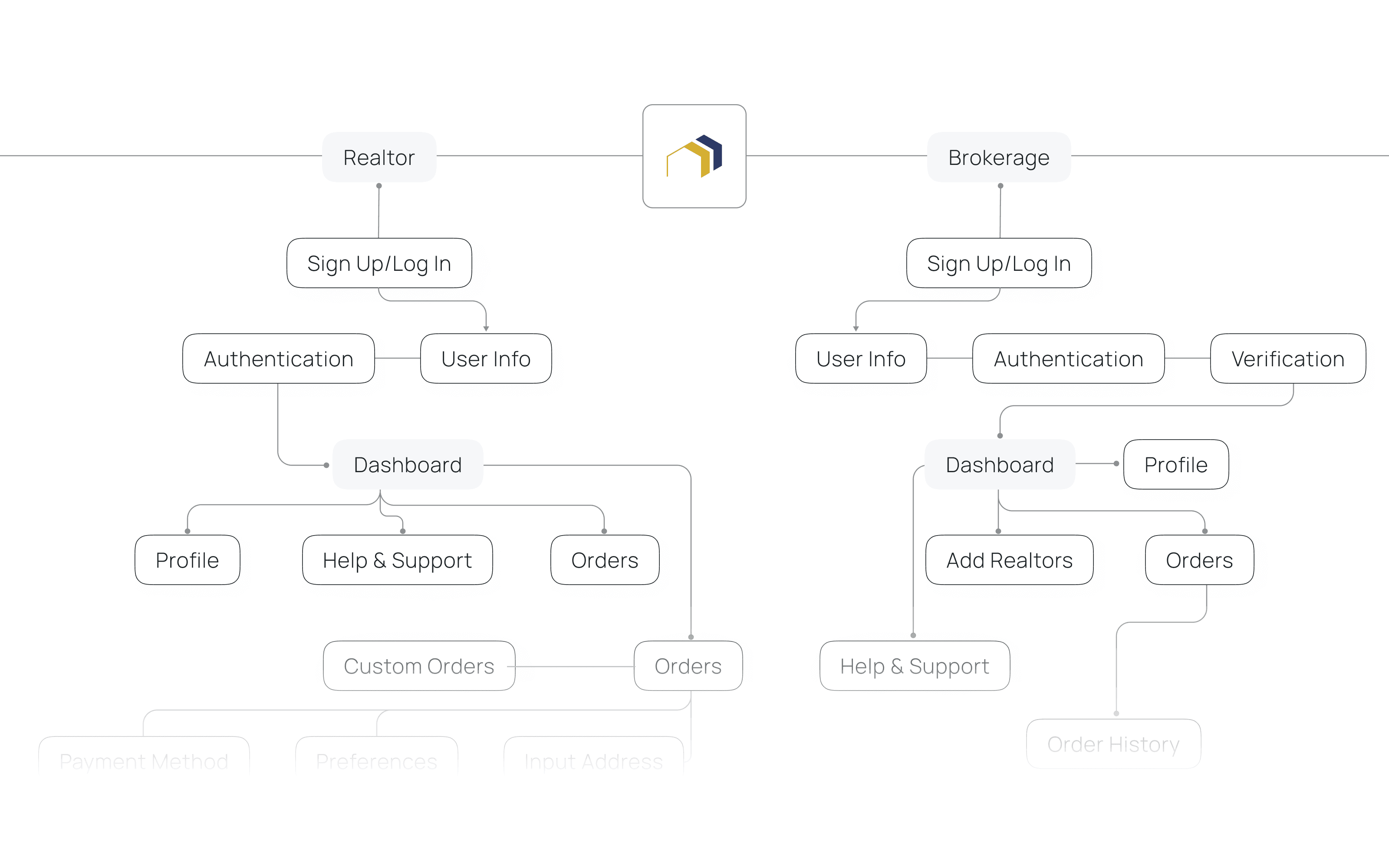
Creating a clean and professional interface language The visual system focused on creating a modern and structured experience that feels professional while remaining approachable and easy to interact with. Typography and spacing were carefully designed to improve readability across information-heavy sections, while cards, dashboards, and interface components were organized to support faster scanning and usability. The overall visual direction aimed to balance operational efficiency with a cleaner and more modern product experience.

Wireframes were used to define navigation systems, dashboard hierarchy, and interaction patterns before moving into final visual refinement. The focus during this stage was understanding how users would move through: - task management - transaction coordination - listing workflows - document handling - communication flows This helped simplify operational complexity before introducing final interface styling.

A modular component system was created to maintain consistency throughout the platform while supporting different operational scenarios. Cards, dashboards, status indicators, communication elements, forms, and workflow components were designed to feel lightweight, organized, and easy to interact with. Creating reusable interface patterns also helped improve scalability across different areas of the platform.


Bringing operational clarity into a single experience
The final interface focused on simplifying task management while supporting the fast-moving nature of real estate operations. By improving hierarchy, reducing unnecessary complexity, and creating more intentional workflows, the platform became easier to navigate and more visually approachable. The result was a cleaner and more structured experience designed to help users stay organized, manage tasks more efficiently, and focus on higher-value work.

Designing for clarity within operational systems
This project reinforced how important usability and organization are when designing workflow-heavy digital products. Beyond functionality, the goal was to create an experience that feels easier to navigate, visually structured, and less mentally demanding for users managing multiple operational responsibilities. Working on My RE Tasker also pushed me to think more intentionally about dashboard hierarchy, scalable interface systems, and how thoughtful interaction design can simplify complex everyday workflows.
