Case study · 2026 · Ongoing
UI Design | Framer Development | AI SaaS Website

My role
UI/UX Designer & Framer Developer
Timeline
Apr 2026 – ongoing
Team
1 Designer & Framer Developer
Lingpad founding team
Platform
Website (Framer)
Status
Live
Introduction
The client
Lingpad is an AI customer support suite. Its AI Translation, AI Agent and AI Copilot help support teams on Zendesk, Intercom, Gorgias and HubSpot reply to customers in every language.
My role
I design and build the Lingpad website directly in Framer: page layouts, components, CMS, breakpoints and interactions. I work with the Lingpad team through short daily stand-ups.
Impact
The website is live and keeps growing. New product, comparison, pricing and content pages are added on one shared system, without a developer handoff.
pages designed and built in Framer
CMS collections: blogs and case studies
breakpoints for every page: desktop, tablet and phone
and growing every week
01 — The brief
Lingpad does a lot: translation, an AI agent and a copilot, plus enterprise security. The website had to explain all of it simply, earn the trust of support leaders and help them choose a plan.
Clarity
Three products, one story
Visitors had to understand what each product does and how they work together in a few seconds.
Trust
Security first
Enterprise teams need to see ISO 27001, GDPR and HIPAA, real customers and reviews before they book a call.
Speed
Ship pages fast
The team needed new pages, comparisons and posts live quickly, without waiting on a developer.
The challenge
02 — Who it's for
The site speaks to two kinds of visitors. Some are exploring AI for their support team. Others are comparing tools and checking security before they buy. Every page had to work for both.
Website
Heads of support exploring how AI can help their team reply faster in more languages.
What they need
• See what each product does in seconds
• Know it works with their helpdesk
• Proof from teams like theirs
What frustrates them
• Vague AI claims
• Long walls of text
• Hidden pricing
Website
Ops and IT teams comparing tools, checking security, cost and fit before signing.
What they need
• Clear pricing and plans
• Side-by-side comparisons
• Security and compliance details
What frustrates them
• Comparisons spread over many sections
• Missing certificates
• No quick way to talk to sales
03 — Research & strategy
I started from the existing site and the team's goals. I looked at how other AI support tools explain their products, then mapped what each page had to do: explain the product, build trust, help buyers decide and get found in search.

What the research told me
Insight 01
One idea per block
Short, focused blocks are easier to scan than long product pages.
Insight 02
Trust sells AI
Security badges, logos and reviews matter as much as features.
Insight 03
Compare in one view
Buyers want a single side-by-side table, not comparisons split over many sections.
How I worked
Kick-off call
Content mapping
Page structure
Framer components
CMS setup
Responsive layouts
Daily stand-ups
Live iteration
04 — Site structure
I grouped the pages by the job they do, so every new page has a clear place: explain the product, build trust, help buyers decide, get found and turn visitors into leads.
Step 1
Explain
Section
Home and the AI Translation, AI Agent and AI Copilot pages.
Goal
Show what Lingpad does in seconds.
Step 2
Trust
Section
Security, Customers and Real Voices.
Goal
Prove it is safe and works.
Step 3
Decide
Section
Pricing, Enterprise and Compare pages.
Goal
Help buyers choose with confidence.
Step 4
Get found
Section
Blogs and case studies, both on the CMS.
Goal
Bring in visitors from search.
Step 5
Convert
Section
Contact Sales, Book a Call and Sign Up.
Goal
Turn visitors into leads.

05 — Key decisions
Each one came back to the same idea: make a complex AI product feel simple and trustworthy.
The problem
Three products and many features made the home page feel heavy and hard to scan.
Options I weighed
Long product sections, or short blocks that each explain one idea.
What I chose
A bento layout with one product or benefit per tile, each with a small illustration.
Why it worked
Visitors can scan the whole offer quickly and jump to the product they need.


The problem
Handing designs to a developer slowed every new page and change.
Options I weighed
Design in Figma and hand off, or design and build directly in Framer.
What I chose
I designed and built every page in Framer, with shared components, CMS and breakpoints.
Why it worked
No handoff: layouts, breakpoints and animations ship in the same tool, and new pages go live faster.
The problem
AI translation is hard to picture from text alone.
Options I weighed
Static screenshots, or simple animated flows that show a message being translated.
Light, looping flows that show a customer message going through Lingpad and back.
Why it worked
Visitors see how the product works in seconds, without reading a paragraph.

06 — Visual direction
I kept Lingpad's warm yellow and bright purple, on soft grey and white. Rounded cards, simple line illustrations and plenty of space make an AI product feel calm and approachable.

07 — Design system
A shared set of colours, type and components, built in Framer so every new page stays consistent on desktop, tablet and phone.
Colour
Lingpad Yellow
#FFC729
Purple
#5D44FF
Ink
#1A1A1A
Mist
#F5F5F7
White
#FFFFFF
Typeface
A friendly geometric sans that stays clear in short headlines and long body text.
Visual language
Rounded cards, pill buttons and simple line illustrations, repeated across every page.
Components
Navigation, bento cards, pricing cards and tabs, comparison tables, review sections, integration grid, FAQ, CTA and footer, each built for every breakpoint.

08 — Final designs
A clear, friendly website where bento blocks, soft motion and a yellow-and-purple palette explain an AI support suite on every screen size.
On tablet

Hero
The product suite at a glance.

Benefits
Why support leaders choose Lingpad AI Agent.
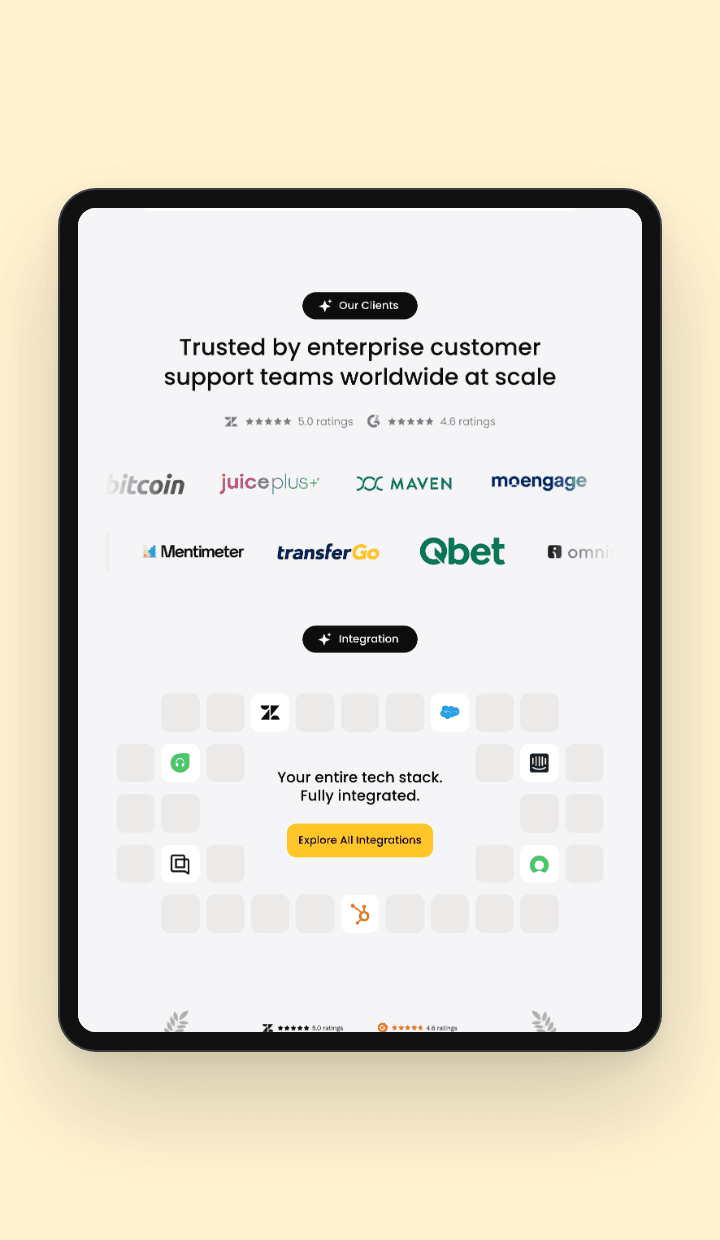
Clients
Customer logos, reviews and integrations.
On mobile
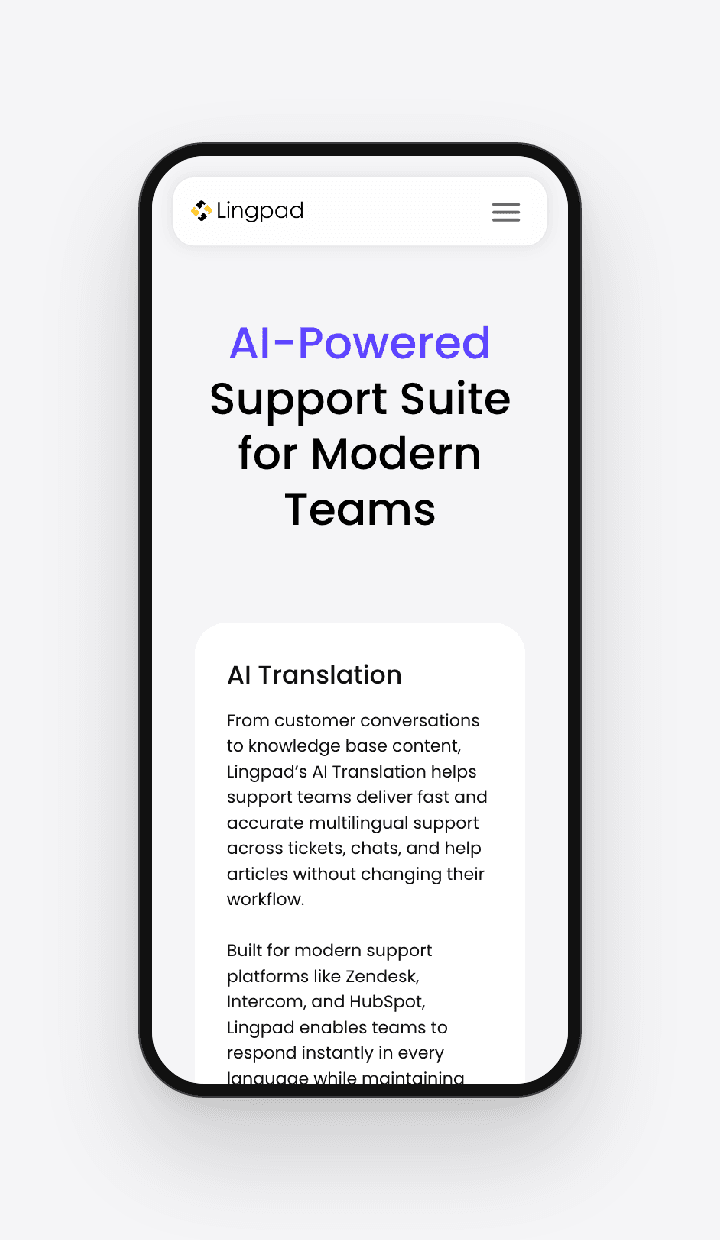
Mobile hero
The same clear message, sized for small screens.

Solutions
AI translation for tickets and help centres.

Integrations
Every helpdesk, fully integrated.
09 — Outcome
The website is live on Framer. The Lingpad team can now launch new product, comparison and content pages quickly, on one consistent system.
pages designed and built in Framer.
CMS collections for blogs and case studies.
and still growing with new pages.
10 — Looking back
Set up the system first
I would build the shared components and styles before the first pages, instead of tidying them up later.
Plan breakpoints early
I would design tablet and phone alongside desktop, so fewer fixes are needed at the end.
Write a page checklist
I would keep a simple checklist for new pages, so every page ships with the same quality.
Learnings
Owning design and build
Designing and building in the same tool makes me faster and more careful.
Systems save time
Good components and CMS make every new page easier.
Clear beats clever
Simple layouts help people understand complex products.
Enjoyed this case study?
© 2026 Lingpad. All rights reserved. Designed by Shreya Pandya.